Blog

  • UPI QR Code Generator: The Complete Guide to Fast Digital Payments

    UPI QR Code Generator: The Complete Guide to Fast Digital Payments

    A upi qr code generator is an online tool that converts a UPI ID, merchant name, amount, or payment note into a scannable QR code. Once generated, customers can scan the code using any UPI-supported payment app and send money directly to the linked bank account. This makes payment collection faster, cleaner, and easier for small shops, freelancers, delivery sellers, service providers, and online businesses.

    Instead of manually typing a UPI ID, the customer simply scans the QR code, checks the receiver name, enters or confirms the amount, and completes the payment. For informational websites like newsgiga com, explaining this process clearly helps users understand how QR-based payments reduce friction in daily transactions.

    How Does a UPI QR Code Generator Work?

    From UPI ID to Scannable Code

    A upi qr code generator works by encoding payment details into a QR format. These details may include the receiver’s UPI ID, payee name, currency, transaction amount, and remarks. When a user scans the QR code, their payment app reads the encoded information and opens the payment screen automatically.

    The process is simple: enter your UPI ID, add optional details, generate the QR code, test it, and then use it on invoices, posters, counters, websites, or product pages. For businesses, this removes the need to repeatedly share bank details and helps customers pay with confidence.

    Static vs Dynamic UPI QR Codes

    Choosing the Right QR Type

    There are two common types of UPI QR codes: static and dynamic. A static QR code usually contains fixed payment information, such as a UPI ID and payee name. The customer enters the amount manually. A dynamic QR code can include a fixed amount, order reference, or transaction-specific information.

    QR Code Type Best For Customer Action
    Static UPI QR Shops, counters, visiting cards, posters Customer enters amount manually
    Dynamic UPI QR Invoices, checkout pages, order payments Amount may be pre-filled

    A static code is ideal for long-term use. A dynamic code is better when accuracy matters, such as online orders or bill payments.

    Why Businesses Use UPI QR Codes

    Faster Checkout and Better Convenience

    Businesses use a upi qr code generator because it simplifies payment collection. Customers no longer need cash, card machines, or account numbers. A QR code can be printed on a bill, shared through WhatsApp, added to a website, or displayed at a shop counter.

    UPI QR codes are especially helpful for small businesses that want a low-cost payment method. They can reduce checkout delays, improve customer experience, and make payments easier to track. For service providers, placing a QR code on invoices can encourage faster payment after work is completed.

    Step-by-Step Guide to Generate a UPI QR Code

    Create and Test Before Sharing

    Generating a UPI QR code is usually quick. However, it is important to check every detail before using it publicly.

    Step Action Why It Matters
    1 Enter your correct UPI ID Prevents payment failure
    2 Add business or payee name Builds customer trust
    3 Add amount if needed Useful for fixed-price payments
    4 Generate the QR code Creates the scannable payment code
    5 Test with a small amount Confirms the code works correctly

    Before printing or publishing the code, scan it yourself and confirm that the receiver name is correct. This small step can prevent confusion and payment mistakes.

    Safety Tips Before Using a UPI QR Code

    Protect Customers and Your Business

    Security matters when using any digital payment method. A upi qr code generator should be used carefully, especially when creating QR codes for public use. Always generate codes from a trusted platform and avoid tools that ask for unnecessary personal information, passwords, card details, or banking login credentials.

    Customers should also verify the receiver name before confirming payment. Businesses should keep their QR code clear, avoid editing it after download, and replace damaged printed codes. If you use the QR code on a website, make sure the page looks professional and trustworthy.

    Best Features of a Good UPI QR Code Generator

    What to Look For

    A good upi qr code generator should be simple, fast, mobile-friendly, and accurate. It should allow users to enter a UPI ID, payee name, optional amount, and payment note. It should also provide a clean downloadable QR code that can be used online or offline.

    Useful features include high-resolution download, transparent background, print-ready format, and easy testing. For business use, a neat QR design helps maintain professionalism. Avoid cluttered designs that make the QR hard to scan.

    Common Use Cases for UPI QR Codes

    Where You Can Place the Code

    UPI QR codes can be used almost anywhere payment collection is needed. Retail stores can place them at checkout counters. Freelancers can add them to invoices. Restaurants can print them on bills. Online sellers can share them after order confirmation. Event organizers can use them for registration payments.

    A website like newsgiga com can also publish educational guides showing how QR payment systems support small business digitization. The keyword upi qr code generator is useful for readers searching for practical payment setup information.

    Frequently Asked Questions

    What is a UPI QR code generator?

    A UPI QR code generator is a tool that creates a scannable QR code linked to a UPI ID for easy digital payment collection.

    Is a UPI QR code free to create?

    Many tools allow users to create a basic UPI QR code for free, especially for simple static payment codes.

    Can I add a fixed amount to my UPI QR code?

    Yes, some generators allow you to add a fixed amount, which is useful for invoices, product pricing, and order payments.

    Is it safe to use a UPI QR code generator?

    It can be safe if you use a trusted tool and never share banking passwords, OTPs, or sensitive login details.

    Can customers scan the QR code with any UPI app?

    In most cases, customers can scan a valid UPI QR code using a supported UPI payment app.

    Conclusion

    A upi qr code generator is one of the simplest tools for accepting digital payments quickly and professionally. It helps businesses reduce manual errors, speed up checkout, and give customers a smooth payment experience. Whether you run a shop, offer services, sell online, or collect invoice payments, a UPI QR code can make transactions easier.

    For the best result, choose the right QR type, enter accurate payment details, test the code before sharing, and keep security in mind. When used correctly, a UPI QR code is not just a payment shortcut. It is a practical bridge between customers and modern cashless business.
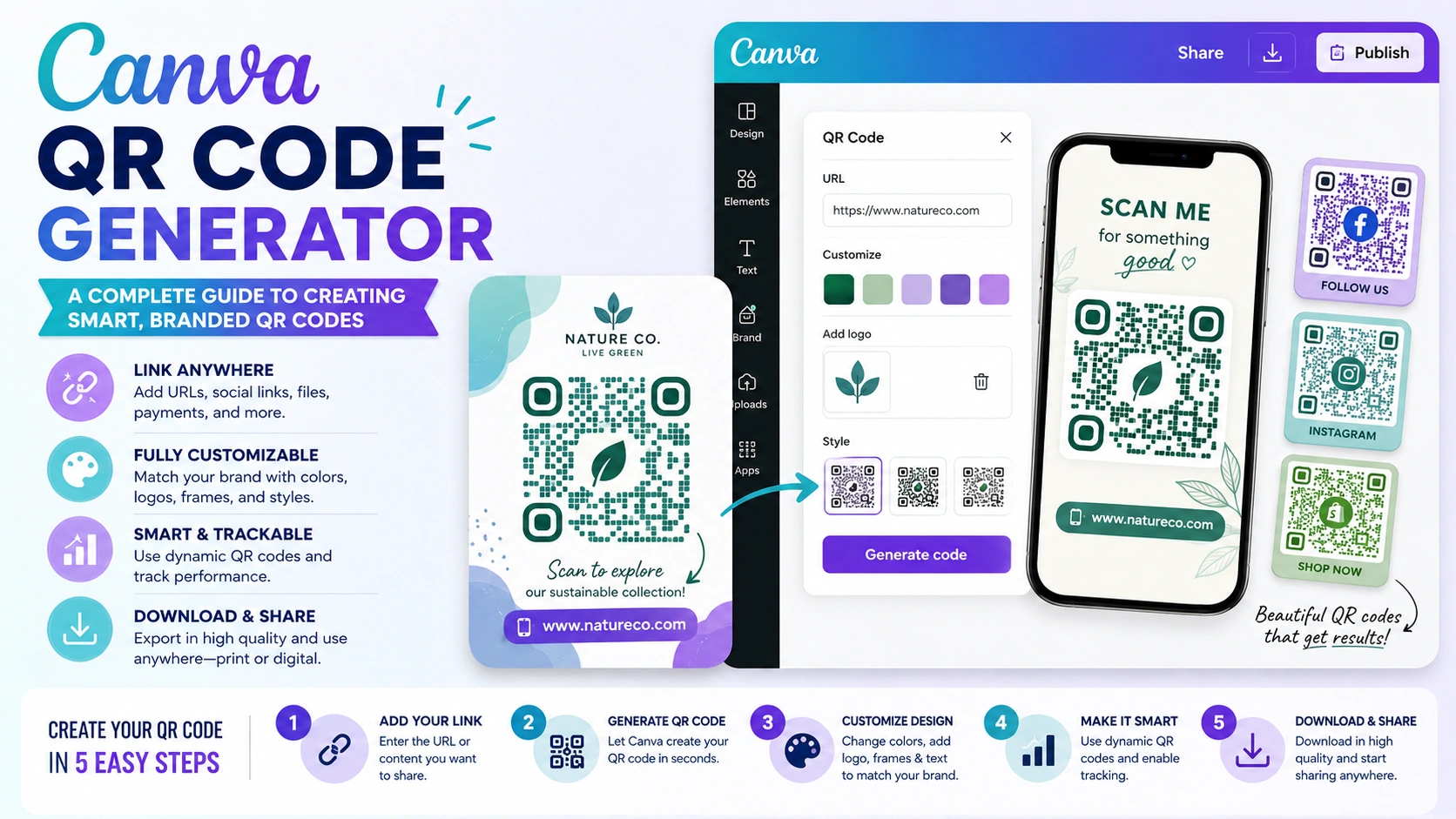
  • Canva QR Code Generator: A Comprehensive Guide to Crafting Clever, Branded QR Codes

    Canva QR Code Generator: A Comprehensive Guide to Crafting Clever, Branded QR Codes

    The Canva QR code generator is a built-in Canva feature that helps users create QR codes for websites, landing pages, menus, portfolios, event pages, social media profiles, and more. You can put a QR code on a design and allow customers to scan it with a smartphone instead of asking them to write a lengthy URL. This makes the user journey faster, cleaner, and more convenient.

    For businesses, creators, bloggers, educators, and marketers, QR codes are now part of modern visual communication. A restaurant can link to a digital menu. A property page can be linked to by a real estate agent. A blogger can link readers to a post on newsgiga com or another website. Canva makes this process easy because you can generate the code and place it directly inside your design.

    Why Use Canva for QR Codes?

    Design and Function in One Place

    The biggest advantage of using Canva is convenience. Making a QR code on one platform and uploading it to another design tool is not necessary. Canva allows you to design posters, flyers, cards, banners, presentations, labels, and social media graphics while adding a QR code in the same workspace.

    This is especially useful for people who want professional-looking marketing materials without advanced design skills. Canva also lets you match the QR code placement with your brand style, layout, color theme, and message. The result is a clean and practical design that looks intentional instead of randomly added.

    How to Create a QR Code in Canva

    Basic Steps for Beginners

    Creating a QR code in Canva is simple. First, open your Canva design or start a new project. Then, go to the apps section and search for “QR Code.” Paste the URL you want people to visit. After that, click generate, and Canva will create a scannable QR code for your design.

    Once the code appears, you can resize it, move it, and place it anywhere on your design. Avoid placing the code on a busy background and leave enough white space around it for optimal results. Before downloading or printing, always test the QR code with your phone to make sure it opens the correct link.

    Step Action Purpose
    1 Open Canva design Start with your poster, flyer, card, or graphic
    2 Search QR Code app Find Canva’s QR code tool
    3 Add your URL Connect the code to a web page
    4 Generate code Create the scannable QR
    5 Test before publishing Confirm it works correctly

    Best Uses of Canva QR Codes

    Practical Ideas for Business and Content

    The canva qr code generator can be used in many industries. Businesses can add QR codes to brochures, business cards, packaging, and signage. Teachers can use them for classroom resources. Event planners can link to registration forms, schedules, or location maps. Bloggers and publishers can link readers to online articles, newsletter signups, or digital downloads.

    For example, a content website such as newsgiga com could use QR codes on printable promotional materials to send readers directly to specific articles or category pages. This helps connect offline attention with online traffic.

    Canva QR Code Generator for Marketing

    Turning Offline Design into Online Action

    QR codes are powerful because they bridge print and digital marketing. A printed flyer can lead to a booking page. A product label can lead to a tutorial. A restaurant table card can lead to a menu. This makes your marketing more interactive and measurable.

    When using QR codes for marketing, make the call-to-action clear. Instead of only placing the code, add a short instruction such as “Scan to View Menu,” “Scan for Details,” or “Scan to Visit Our Website.” A QR code without context may be ignored, but a QR code with a clear benefit encourages action.

    Design Tips for Better QR Codes

    Keep It Clean and Easy to Scan

    A QR code ought to be straightforward, unambiguous, and simple to scan. Avoid making it too small, especially for printed designs. Keep strong contrast between the code and background. Black on white is usually the safest option. If you use colors, make sure the code still scans properly.

    Do not cover the code with heavy graphics, icons, or decorative elements. Canva allows you to create beautiful designs, but the QR code must remain functional. A good design should support the QR code, not make it harder to use.

    Design Element Recommended Practice Avoid
    Size Keep large enough to scan Very tiny QR codes
    Contrast Dark code on light background Low-contrast colors
    Space Add margin around the code Crowded placement
    Testing Scan before publishing Assuming it works
    CTA Add clear instruction No explanation beside code

    Canva QR Code Generator for Print Materials

    Flyers, Menus, Cards, and Posters

    Canva is especially useful for print-ready QR code designs. You can design flyers that direct customers to landing pages, restaurant menus with digital ordering links, posters with event registration links, and business cards with website links.

    For print, always download your design in a high-quality format. PDF Print is usually a strong choice for professional printing. Also, make sure your QR code is not placed too close to the edge of the design, where it might be trimmed. Testing a printed sample is the safest way to confirm readability.

    Canva QR Code Generator for Digital Content

    Social Media, Presentations, and Online PDFs

    QR codes are not only for printed materials. They can also be used in digital presentations, online brochures, downloadable guides, and social media graphics. For example, a presenter can add a QR code to a slide so the audience can instantly access a resource, form, or website.

    Digital QR codes work best when the audience is viewing the design on a second screen or in a setting where scanning is natural. In some cases, a clickable link may still be better. The best approach is to use both when possible: add a QR code for scanning and a short link for clicking.

    Common Mistakes to Avoid

    Do Not Forget Testing and Clarity

    Making a QR code and releasing it without testing is a frequent error. Even if the code looks correct, the link may be wrong, broken, or difficult to open. Another mistake is using a QR code without explaining what users will get after scanning.

    Also, avoid linking to pages that are not mobile-friendly. Since most QR codes are scanned on phones, the destination page should load quickly and look good on mobile screens. The QR code is only the first step. The page experience after scanning matters just as much.

    FAQs About Canva QR Code Generator

    Is the Canva QR code generator free?

    Canva offers QR code generation inside its platform, and many users can access it while creating designs. Some design features, templates, or brand tools may depend on your Canva plan.

    Can I use Canva QR codes for business?

    Yes, you can use Canva QR codes for business cards, flyers, menus, posters, packaging, presentations, and other marketing materials.

    Can I customize the QR code in Canva?

    You can resize and position the QR code inside your Canva design. However, always keep the code clear, high-contrast, and easy to scan.

    Do Canva QR codes expire?

    Static QR codes usually continue working as long as the destination URL remains active. If the linked page is removed or changed, the QR code may no longer be useful.

    Should I test my QR code before printing?

    Yes. Always scan the QR code with a smartphone before downloading, sharing, or printing your design.

    Conclusion

    The canva qr code generator is a practical tool for anyone who wants to connect offline designs with online destinations. It is simple enough for beginners but useful enough for businesses, marketers, educators, creators, and publishers. With Canva, you can create a QR code and place it directly inside a polished design without switching between multiple platforms.

    The key is to keep the QR code clear, scannable, and supported by a strong call-to-action. Whether you are designing a menu, poster, business card, flyer, presentation, or digital guide, Canva helps you turn a simple design into an interactive experience. When used correctly, QR codes can improve engagement, make information easier to access, and guide users smoothly from design to action.

  • Location QR Code Generator: Create Maps & Drive Foot Traffic

    Location QR Code Generator: Create Maps & Drive Foot Traffic

    This is the power of a location qr code generator. Imagine a customer stands outside your shop after hours. They want to return tomorrow but do not know your exact address. They search their phone, get confused by similar business names, and give up. You just lost a sale.

    Now imagine a different scene. The same customer scans a quick response code on your window. Instantly, Google Maps opens on their phone. It shows your exact storefront, your operating hours, and a direct route from their home. They save the location and return the next day.

    This is the power of a location qr code generator. It bridges the gap between the physical world and digital navigation. In this guide, you will learn how to use this tool to boost foot traffic, improve event attendance, and make navigation seamless for your audience.

    What is a Location QR Code Generator?

    A location qr code generator is a digital tool that embeds geographic coordinates into a scannable barcode. These coordinates typically consist of latitude and longitude data. When a user scans the code with a smartphone camera, the device translates the data into a map link.

    Most generators link directly to navigation apps like Google Maps, Apple Maps, or Waze. The user does not need to type an address, search for landmarks, or risk entering the wrong street name. One scan provides instant, flawless routing.

    History & Evolution of Location QR Codes

    QR codes were invented in 1994 by Denso Wave to track automotive parts. In the early days, they required clunky, third-party scanning apps. Users found them frustrating, and adoption crawled.

    The breakthrough came in 2017 when Apple and Android integrated QR scanners directly into smartphone cameras. Suddenly, scanning became effortless.

    As static website links grew common, developers realized QR codes could hold other data types. By embedding map URLs and geographic coordinates, tech companies created the first location-based codes. Today, these codes support dynamic tracking, allowing businesses to change the destination address without printing a new code.

    Why is a Location QR Code Generator Important?

    Local visibility drives revenue. According to recent search data, nearly 76% of people who conduct a local smartphone search visit a business within 24 hours. A location qr code generator capitalizes on this intent by removing all friction from the journey.

    In real estate, retail, and tourism, getting people to the physical location is the hardest challenge. If a customer misspells your street name, they might end up at a competitor’s door. This tool removes human error entirely. Experts agree that offline-to-online marketing relies on speed, and nothing connects physical ads to digital maps faster than a QR code.

    How Does a Location QR Code Generator Work?

    The mechanics behind the tool are straightforward but highly effective:

    1. Data Input: You enter an address or drop a pin on a digital map within the generator.
    2. Data Encoding: The software converts that location data into a short URL or raw geographic coordinates.
    3. Pattern Generation: The tool arranges black and white squares into a unique grid pattern that scanners can read.
    4. The Scan: A smartphone camera detects the three large alignment squares in the corners of the code.
    5. Redirection: The phone reads the embedded link and automatically launches the user’s default map application with the route pre-loaded.

    Key Benefits of Location QR Codes

    Using a location qr code generator offers massive advantages for your business operations:

    • Zero Typing Errors: Customers never get lost due to spelling mistakes.
    • Instant Navigation: One second is all it takes to launch turn-by-turn directions.
    • Boosts Foot Traffic: Simplifies the process of visiting physical retail stores.
    • Tracks Scans: Dynamic codes let you see how many people scanned the code and when.
    • Saves Print Space: You do not need to print long, ugly addresses on small business cards or flyers.

    Challenges & Common Misconceptions

    Many business owners believe QR codes are difficult to create or require expensive software. This is a myth; basic static location codes are completely free.

    Another common challenge is poor print placement. If you place a QR code on a moving vehicle or a glossy, reflective surface, smartphone cameras will struggle to focus.

    Furthermore, you must ensure the code is large enough to scan from a distance. A tiny code printed on a massive billboard is useless to drivers passing by. Always test your printed codes across multiple device types before launching a campaign.

    Location QR Codes: Latest Trends & Innovations

    The technology surrounding the location qr code generator continues to evolve rapidly. We are seeing a major shift toward custom branded codes. Businesses no longer use basic black-and-white grids. Instead, they incorporate company logos, custom colors, and rounded data points to match their visual branding.

    Additionally, augmented reality (AR) is merging with location codes. Scanning a code at a historic site might open a map that overlays historical images on top of the user’s current view. Smart cities are also adopting these codes on public transit signs to give travelers real-time arrival updates based on their specific bus stop location.

    How to Use a Location QR Code Generator (Step-by-Step)

    Follow these simple steps to build your own navigation code:

    1. Choose a Reliable Generator: Select a reputable platform that offers location features.
    2. Select the Location Option: Click on the “Location”, “Maps”, or “Coordinates” tab in the tool dashboard.
    3. Enter Your Address: Type your exact business address or enter your precise latitude and longitude coordinates.
    4. Customize the Design: Add your company brand colors or place your logo in the center of the code.
    5. Test the Code: Scan the digital preview on your computer screen using your own smartphone to ensure it opens the correct map app.
    6. Download High-Res Files: Save the file in a vector format like SVG or EPS for high-quality printing.

    Best Tools for Location QR Codes

    • QR Code Generator by Bitly: A reliable industry standard that offers robust dynamic tracking features and smooth map links.
    • Beaconstac (Uniqode): Excellent for enterprise businesses requiring security, bulk creation options, and advanced analytics data.
    • QR Code Chimp: A highly creative platform loaded with unique design templates, shapes, and branding tools.

    Case Studies & Success Stories

    A regional food truck festival used a location qr code generator to guide hungry visitors to specific vendor stalls spread across a massive public park. By printing specific map codes on signs at the park entrance, they cut guest confusion down by 40% and boosted individual vendor sales.

    In another example, a luxury real estate agency placed large map QR codes on their “For Sale” lawn signs. Potential buyers driving by could scan the sign to immediately view property boundaries and get directions to the upcoming open house event. This simple trick doubled their event attendance over a single weekend.

    Expert Tips & Best Practices

    • Always Add a Call to Action (CTA): Never print a bare code. Write text next to it like “Scan to Navigate” or “Scan for Directions.”
    • Keep Contrast High: Always use a dark foreground pattern on a light background color so cameras can read it easily.
    • Use Dynamic Links: Choose dynamic options so you can change the target address later without reprinting your flyers.
    • Check the Size: Ensure your printed code is at least 2 x 2 centimeters for close-up scanning.

    Frequently Asked Questions

    Does a location QR code cost money to make?

    No, creating a basic static location code is free on most online platforms.

    Will the code work on both Android and iPhone?

    Yes, modern Android and iOS camera apps recognize map coordinates natively.

    Can I change the address after printing the code?

    Only if you use a dynamic location qr code generator. Static codes cannot be edited after printing.

    Do users need a specific app to scan it?

    No, users simply open their default smartphone camera app to read the code.

    What happens if a user does not have Google Maps?

    The code will typically open the location in their smartphone’s default web browser map instead.

    Can I track how many people scan my map code?

    Yes, dynamic code platforms provide full analytics, including scan counts, times, and device locations.

    How long do these QR codes last?

    Static codes never expire and will work forever as long as the destination address remains active.

    Conclusion

    A location qr code generator is a simple, cost-effective tool that links your physical assets to digital maps. By removing navigation friction, you make it easy for clients, shoppers, and guests to find your front door. Implement these codes on your marketing materials today to capture ready-to-buy local traffic and grow your business footprint.